On this page
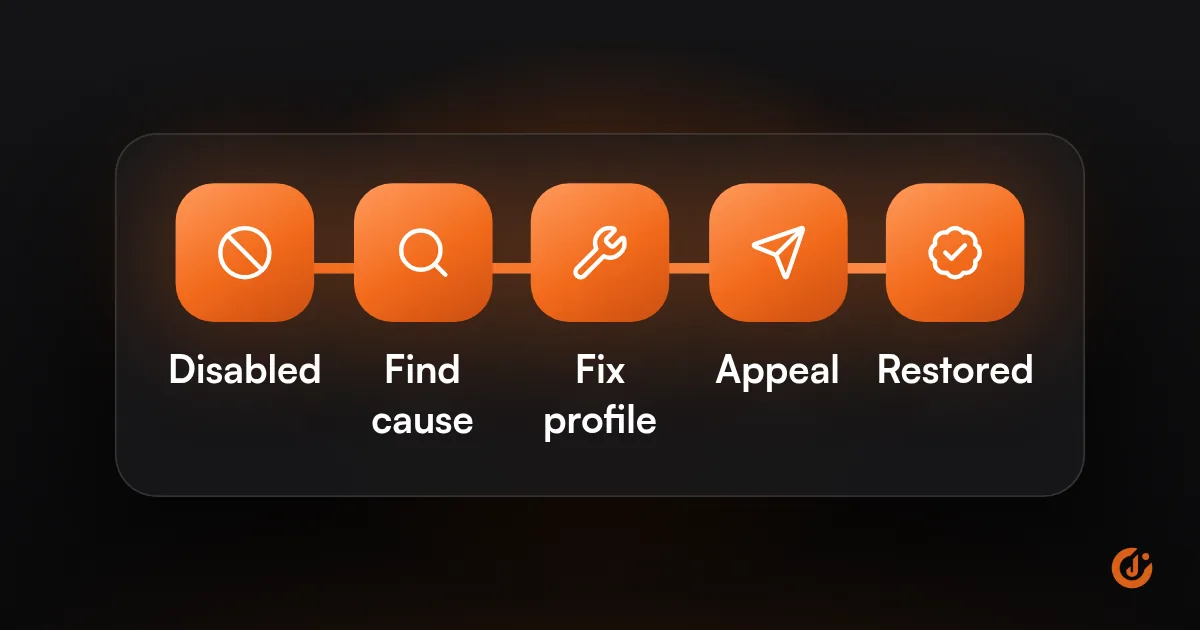
A disabled Google Business Profile has been taken down because Google believes it breaks its guidelines, often for a business type or address that does not qualify, duplicate listings, or edits that look like spam. Read the notice, fix the cause on the profile and website, then submit an appeal with proof the business is real.
What Does “Disabled” Mean, and How Is It Different From Suspended?
A disabled Google Business Profile is one Google has removed for a guideline problem. Google’s help page says that when a profile is removed, the public cannot go to it and the owner and managers cannot act on it.
Google does not publish a strict definition that separates “disabled” from “suspended.” As of October 2026, both are covered by the same help page (“Fix suspended or disabled profiles”) and the same appeals tool. Its policy overview does give examples of when each word is used, which is the closest thing to an official difference:
| What you see | When Google says it applies | What it means for you |
|---|---|---|
| Profile disabled | Google determines the business does not exist at the location claimed | The listing is treated as not real at that address. You need proof of the location. |
| Profile suspended | A P.O. box is used as the address, or the Google Account behind the profile is restricted | The address or the account is the problem. Fix that first. |
| Account restricted | A pattern of policy violations on the account | All profiles on the account are suspended, and you cannot create or claim others until the restriction is lifted. |
| Edit not approved | Google cannot confirm a change is accurate | The profile stays live. Only the change was refused. |
In practice, treat the label as less important than the reason. The appeals tool shows the specific reason for your profile and links to the policy Google thinks was broken. If your notice says suspended, our guide to a suspended Google Business Profile covers that case in more detail.
Why Do Profiles Get Disabled?
Profiles get disabled when Google decides the listing does not follow its guidelines for representing a business. Most cases come down to where the business is, what it is called, or how many profiles it has.
- The business is not really at the address. Google says virtual offices are not eligible, and a rented mailing address where you do not operate does not qualify. Example: a consultant who lists a mailbox store as an office.
- The address type is not allowed. P.O. boxes and remote mailboxes are not acceptable. A co-working space counts only if you have clear signage, receive customers there and staff it during business hours. Example: a law firm using a shared desk with no sign.
- There is more than one profile for the same business. Google’s rule is one profile per business. Example: an HVAC company with one profile for heating and another for air conditioning.
- The name has extras in it. Google says adding unnecessary information to the name is not permitted and could result in suspension. Example: “Smith Plumbing – 24/7 Emergency Plumber Dallas” when the sign says “Smith Plumbing.”
- An edit changed what the business appears to be. Google’s policy overview says edits that significantly change the nature of a business are often fraudulent and may be rejected. Example: a locksmith profile that becomes a towing company overnight.
- The account is restricted. If the Google Account that owns the profile is restricted, its profiles are suspended too.
Google Business Profile Edits Rejected: Is That the Same Thing?
No. A rejected edit is a smaller issue, and the profile usually stays live. Google gives each edit one of three statuses: Accepted, Not approved or Pending. It says edits usually take up to 10 minutes to review but can take up to 30 days, and that it may not approve a change if it cannot confirm it is accurate (as of October 2026).
If your Google Business Profile edits are rejected, make sure the same detail appears on your website, your signage and your other listings before you try again. For US businesses, Google routes rejected edits through its support contact form, not the appeals tool. Sending the same refused change again and again does not add proof; fix what Google can see first.
What Should You Fix Before Appealing?
Fix everything the reviewer will look at before you appeal: the name, address, categories, duplicates and the matching details on your website. Because the appeal can be submitted only once in the tool, this step decides most outcomes.
| Check | What Google expects | What to fix |
|---|---|---|
| Business name | The real-world name on your sign, website and stationery | Remove cities, services, taglines and phone numbers |
| Address | A real location where you operate | Replace any P.O. box, mailbox or virtual office with your true location |
| Signage | Permanent fixed signage if you show the address | Put up proper signage, or hide the address if customers do not visit |
| Service area | One profile, address hidden, area within about 2 hours of driving from your base | Hide the address and trim the service area |
| Categories | As few as possible, describing what the business is | Remove categories added only as keywords |
| Duplicates | One profile per business | Find and remove or merge extra listings (see below) |
| Website | Same name, address and phone as the profile | Update the contact page and footer to match |
How this looks by business type:
- Plumbers, electricians and other service-area businesses: hide the address, keep one profile and set realistic service areas. See how to rank on Google Maps without a storefront address.
- Dental and medical practices: the practice gets one profile for the location. A practitioner’s own profile should carry only the practitioner’s name.
- Law firms and consultants in shared offices: check that you have your own signage and staffed hours at that address.
- Restaurants and shops inside another business: a distinct business, such as a restaurant inside a hotel, generally needs its own separate profile. A section of a store does not qualify for one.
Then gather your documents. Google accepts official business registration, a business license, tax certificates and utility bills for the business. The business name and address on each one must match the profile.
FREE LOCAL SEO AUDIT
Find Out Why You Are Not Showing Up on Google Maps
JuvioX reviews your Google Business Profile, reviews and local pages, then sends a prioritized list of what to fix first. Free, with no obligation.
How Do You Appeal?
You appeal through the Google Business Profile appeals tool, signed in to the Google Account that owns the profile. These are the steps on Google’s help pages as of October 2026:
- Confirm the profile now follows the guidelines.
- Open the Google Business Profile appeals tool and check you are signed in to the right account.
- Select the profile and continue. The tool shows the decision, the reason, a link to the policy and whether it can be appealed.
- Choose to submit an appeal and add your evidence. Once you open the evidence form, Google says you must submit it within 60 minutes or it will not be attached, so have the files ready.
- Use the text box to explain briefly what was wrong and what you changed.
- Submit, then wait for the email. Google says reviews take up to 5 business days and asks you not to send more appeals for the same issue in the meantime.
You can check progress in the same tool. The statuses are Submitted, Approved, Not Approved, Can’t be appealed and Eligible for appeal.
If the account itself is restricted, lift that restriction first, then appeal the profile. If the appeal is not approved, Google’s help page says you can submit additional evidence through its appeals contact form. There is no promise of reinstatement at any stage, and no outside company can speed up or guarantee Google’s decision.
While the profile is down, it helps to know what it was worth. If your tracking and analytics show how many calls and form leads came from the profile, you can decide how much to lean on other channels until it is back.
What About Duplicate Listings and Two Profiles?
Google allows one profile per business, and a duplicate Google Business Profile listing will not show on Search or Maps. Google flags duplicates when a verified profile already exists for the business, when there are several profiles at the same address, or when there are several profiles offering different services.
So can you have two Google Business Profiles? Only when they represent things Google treats as separate:
| Situation | Allowed? |
|---|---|
| Two real locations, each with its own staff | Yes, one profile per location |
| A public-facing department with a different name, such as a service department at a car dealership | Yes, if it operates as a distinct entity |
| A practitioner (doctor, lawyer, agent) alongside the practice | Yes, with the practitioner’s name only |
| Two different businesses at one address | Yes, with different names and clearly different signage |
| One profile per service you offer | No. List the services on one profile |
| One profile per city you travel to | No. Use one profile with a service area |
| A new profile after moving | No. Update the address on the existing profile |
To clean up duplicates, you can remove one you created by mistake, but removing it deletes its content and managers, so check you are keeping the right one. To merge two listings for the same business, suggest it on Google Maps; Google reviews merge requests before approving them. When profiles merge, Google says reviews are combined but replies to reviews may be lost.
If the duplicate exists because someone else verified your business first, request access from the current owner. Our guide to Google Business Profile verification covers claiming a profile.
How Do You Avoid It Happening Again?
Keep the profile matched to the real business, limit who can edit it, and keep your proof on file. Most repeat problems come from a change someone made without checking the guidelines.
- Keep the profile in your own Google Account, with any agency or staff added as managers.
- Use the name on your sign. Nothing else.
- When you move, rebrand or change your main service, update the existing profile and have documents ready for the new details.
- Change your website, signage and profile together so they agree.
- Keep registration, license and a recent utility bill in one folder.
- Check Google Maps for duplicates a few times a year.
- Ask for reviews honestly. Never pay for them or offer rewards. US federal rules (FTC) also cover fake reviews; if you are unsure about a review practice, ask an attorney. Related: why Google reviews disappear.
If you want a second pair of eyes before you appeal, our local SEO team can review the profile, website and listings against Google’s guidelines. JuvioX works on a flat monthly management fee, month-to-month with no lock-in, and the audit is free.
FREE LOCAL SEO AUDIT
Find Out Why You Are Not Showing Up on Google Maps
JuvioX reviews your Google Business Profile, reviews and local pages, then sends a prioritized list of what to fix first. Free, with no obligation.
FAQ
Frequently asked questions
How do I reactivate my Google Business Profile?
Fix whatever broke the guidelines, then submit an appeal in the Google Business Profile appeals tool with documents that show your business name and address. Google says it reviews appeals in up to 5 business days and emails the decision (as of October 2026). Reinstatement is Google's decision and is never guaranteed.
Why is Google saying my account is disabled?
An account message is different from a profile message. If the Google Account that owns the profile is disabled or restricted, Google removes or suspends the profiles it owns, and reinstating the account restores them. Sort out the account first, then check each profile in the appeals tool.
Can you have two Google Business Profiles?
Only for things Google treats as separate: different locations with their own staff, a distinct public-facing department, an individual practitioner, or two different businesses at one address with different names and signage. You cannot have two profiles for the same business, one per service, or one per city you serve.
Should you create a new profile?
No. Google says not to create a new Business Profile for the same business while an appeal is under review, and a profile it considers a duplicate will not show on Search or Maps. A second profile can also make the original problem look worse.
Do you lose your reviews?
Google's help pages do not say what happens to reviews on a disabled profile. Reviews belong to the profile, so they are not visible while it is down, and a brand-new profile would start without them. That is one more reason to appeal the original profile.
3 sources & references
- Business Profile Help Fix suspended or disabled profiles support.google.com
- Business Profile Help Guidelines for representing your business on Google support.google.com
- Business Profile Help Resolve duplicate profiles & ownership issues support.google.com
Official pages we checked when writing this article.